You can use CloudLinux Selector to enable the Mailparse extension in PHP via cPanel.
1. Log in to your cPanel account.
2. In the Software section, click on Select PHP Version.

3.Under the Account Global Settings, go to the Extensionstab.
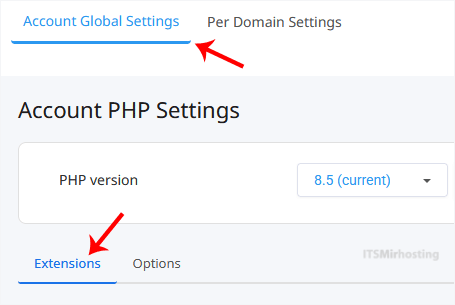
Note: If it shows an error related to the Native PHP version, change to a non-Native PHP version first.
4. Checkmark the Mailparse. Once enabled, it will display a success message.

The message will read that the module Mailparse is saved.
Note: This tutorial covers enabling the Mailparse extension on all domains. To enable it for an individual domain, go to Per Domain Settings, click on the Per Domain option, and then select Mailparse for the domain you wish to enable it on.